- Adobe Reader XI v11.0.2 offline installer
- Adobe Flash Player 11.5.502.135 offline installer
- Flash Player 11.4.402.287 offline installer
- Adobe Flash Player 11.5.502.149
- Adobe Reader 10.1.4
- Java Runtime Environment 1.7.0.7 (32-bit/64-bit)
- Windows 8.1 Skin Pack
- Adobe Flash Player 11.5.502.135 offline installer for IE
- PDF to Word Converter (64 bit)
- Zoner Photo Studio 14
 Skype 5.10.0.116
 Glary Utilities 2.51.0 system optimizer
 Internet Download Manager 6.12 Build 12
 Firefox 29.0.1 FINAL
 CCleaner 3.22.1800
 Avast! Free Antivirus 7.0.1466
 Download Winamp 5.63
 Opera web browser 12.10 32bit
 IncrediMail 2 Build 5233
 GOM Media Player 2.1.43.5119

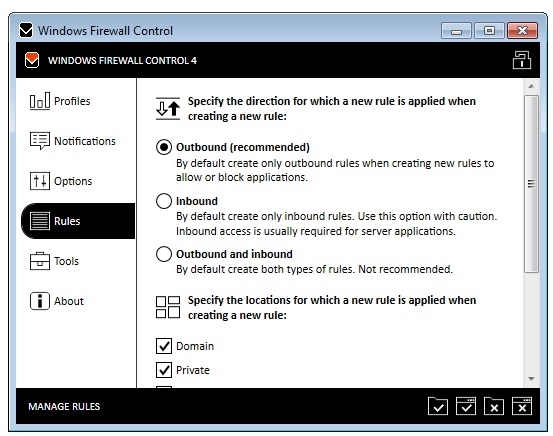
Windows Firewall Control is a nifty little application which extends the functionality of the Windows Firewall and provides quick access to the most frequent options of Windows Firewall. Windows Firewall Control offers four filtering modes which can be switched with just a mouse click. It is free to use, registered users will get the advantage of learning mode which provides notifications for outgoing blocked connections. This is the best tool to manage the native firewall from Windows 8, Windows 7 and Windows Vista.
Windows Firewall Control features a control panel where you can make additional tweaks. You can integrate the tool into the Explorer context menu, set it to autorun at startup, disable other programs from adding firewall rules, activate global hotkeys for the control panel and rules management area, adjust the frame's hue, import and export rules, as well as access some Windows tools (Firewall with Advanced Security, Command Prompt, Event Viewer, Resource Monitor, Windows Registry).
Windows 7 Codecs 3.8.1
Windows 7 Codecs 3.8.1 pack does not conflict with the built-in Window 7 native codec support – it simply allows you to play almost every single media file format on your Windows 7 running computer. The...

NetWorx 5.2.12 bandwidth controller
NetWorx is a simple and free, yet powerful tool that helps you objectively evaluate your bandwidth situation. You can use it to collect bandwidth usage data and measure the speed of your Internet or any other network ...

Windows 7 Codec Pack 4.0.8.829
The Windows 7 Codec Pack is an easy way to install all main stream codecs to play movie and music files downloaded from the internet or ripped from original discs. Installation is made simple with an easy install...
Windows 8.1 Skin Pack
Windows 8.1 skin pack is really making use of windows7 & XP that we really like windows 8.1 At the appearance of the skin pack up menu properties and even the buttons are very similar to Windows...